
MindFocus
OFFICIAL CHROME EXTENSION · FREE v0.1.9
Less distraction.
More of what matters.
Focus on one thing at a time. Set a clear objective, start a timed session, and make steady progress with a calm workspace in Chrome's sidebar.
Free edition · No MindFocus account · Chrome desktop
 mindfocus.SMALL STEPS. STRONGER FOCUS.◖))
Make time for the work that matters.
BUILT FOR THE MOMENTS THAT COUNT
A simpler way to
stay on task.
MindFocus helps you practice a consistent routine: choose a task, protect your time, and reflect on what you accomplished.
Start with one task
Set an optional objective and run a 5-, 10-, or 25-minute focus timer. Pause, resume, or reset when needed.
Block digital distractions
Enable optional Focus Lock to pause access to selected supported websites during an active session.
See your progress
Review focus minutes, sessions, activity categories, and optional outcome reviews in Personal Insights.
Park a thought
Write down an interruption for later, or use the 60-second Mind Reset exercise to return to your work.
INSIDE MINDFOCUS
Designed for clarity.
A focused interface that puts the next task—not a complicated dashboard—at the center.
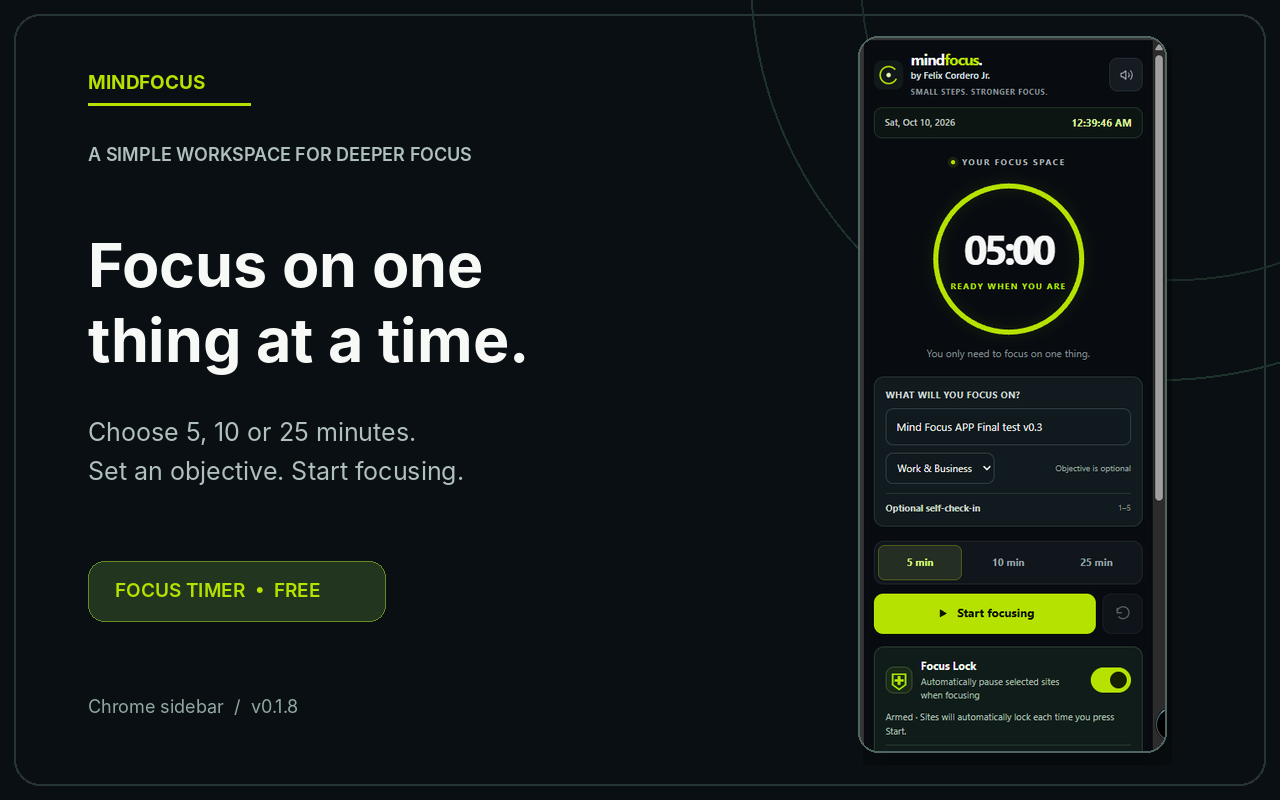
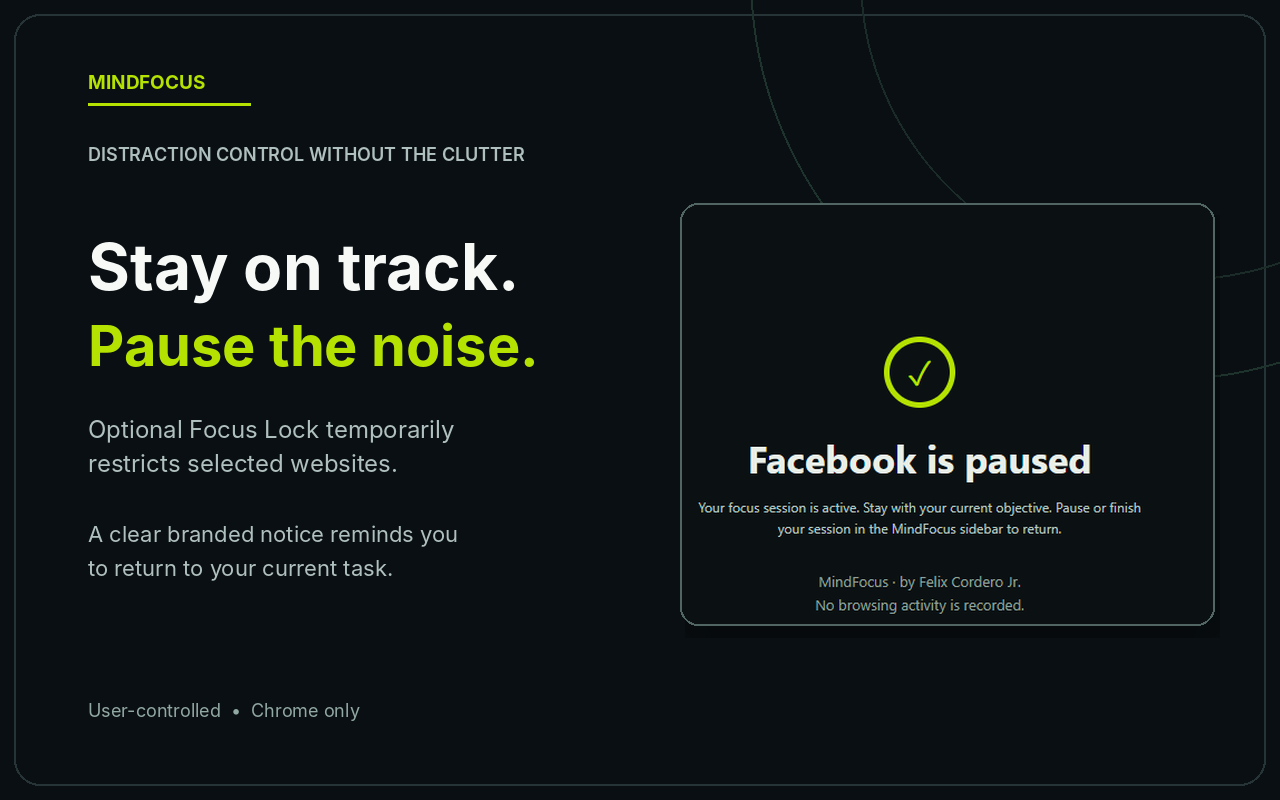
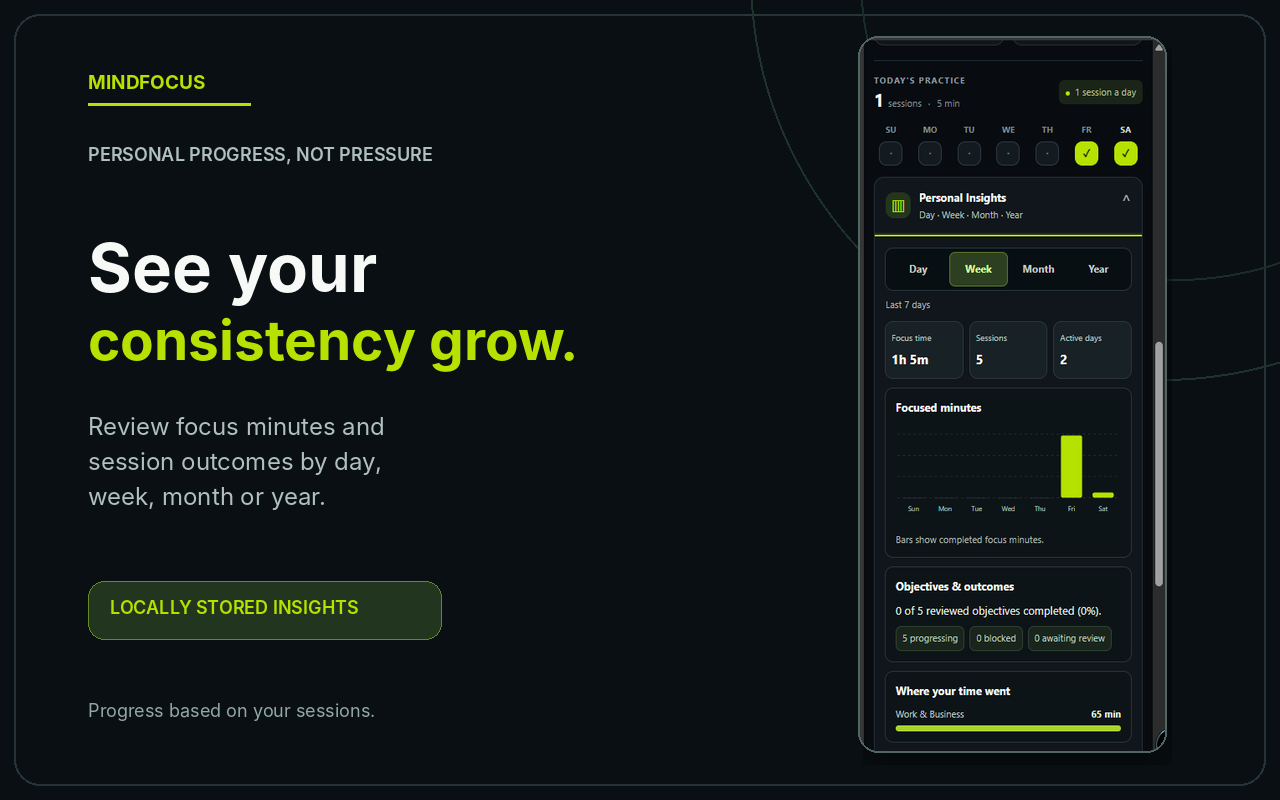
Release-preparation screenshots illustrate the product experience; some image labels may reflect an earlier build. Free v0.1.9 is the current published extension version.
A PRACTICAL ROUTINE
Three steps.
One clear direction.
Choose your objective
Name one task and choose a session length. An objective is optional if you simply want to practice focused time.
Start focusing
Turn on Focus Lock if you want supported distraction sites temporarily paused, then begin your timer.
Review the session
Once the timer finishes, your completed time is recorded. Optionally classify your objective outcome and review Insights.
Finishing a timer records focused time—not automatic completion of your objective. Session outcomes are optional self-reports.
YOUR WORKSPACE. YOUR CHOICE.
Privacy isn't an afterthought.
MindFocus Free stores your objectives, completed-session history, notes, ratings and preferences in your Chrome browser profile. No MindFocus sign-in is required, and the Free edition has no developer-operated sync service or advertising analytics SDK.
Read the full Privacy PolicyLocal recordsSession data is stored using chrome.storage.local.
Website access explainedSite-scoped permissions support optional Focus Lock; the extension does not intentionally read private messages or log browsing history.
Know the security limitsMindFocus does not separately encrypt local records or exported JSON files. Protect your browser profile and exports.
GOOD TO KNOW
Frequently asked questions.
Is MindFocus free?
Yes. MindFocus v0.1.9 is the free edition. It has no subscriptions, payments, account registration, or paid feature gates. Any future paid offering would be announced separately.
Does it work on Android or iPhone?
MindFocus is currently designed for Google Chrome 116 or newer on desktop. Standard Chrome on Android and iOS does not support this extension.
Why does Chrome request website access?
Optional Focus Lock needs permissions for the supported sites where it displays local pause notices during a running session. Chrome may describe those permissions as the ability to “read and change” data. The current extension uses site identification and Focus Lock state; it is not designed to extract private messages, form submissions, or browsing logs.
Why might Chrome display a caution message during installation?
Chrome can display additional warnings for extensions that have not yet established Enhanced Safe Browsing publisher trust. MindFocus's Chrome Web Store publication and website ownership do not constitute a guarantee of security. Review the permissions and Privacy Policy before installing.
What happens to blocked tabs after a session?
When a session is paused or completed, Focus Lock restrictions are released. Tabs already showing a MindFocus pause notice may remain on that notice until you select its Return link.
Does MindFocus read or transmit my notes?
The Free edition stores notes locally and does not intentionally send them to the developer or an AI service. Notes and exported JSON files are not independently encrypted by MindFocus, so avoid entering sensitive credentials and keep exports secure.
Can I restore data after uninstalling?
Uninstalling usually removes extension-local storage. You can export a JSON backup, but v0.1.9 does not include a JSON import feature. Export before uninstalling and understand that the file cannot currently be re-imported by the extension.
Are contributions required to use MindFocus?
No. MindFocus Free has no account requirement, payment gate or subscriptions. Creator support is optional. The GCash QR on this page allows voluntary contributions outside MindFocus. No contribution unlocks additional features.

THE PERSON BEHIND THE PRODUCT
Meet the developer.
Felix Cordero Jr.
Web Systems Developer Technical SEO AI Automation
MindFocus was independently created by Felix Cordero Jr., a web systems developer with more than seven years of experience building WordPress solutions, digital workflows, and performance-focused websites.
His goal is to create practical tools that help people work with greater clarity and make measurable progress—one focused session at a time.
Independently developed Part of the Felix Systems product ecosystem
SUPPORT INDEPENDENT DEVELOPMENT
A little support goes a long way.
Hi! I'm Felix, the independent developer behind MindFocus. I built it to help make focused work a little easier, one session at a time.
If MindFocus has been useful to you and you'd like to help me keep improving it, you're welcome to send a voluntary contribution. Every bit of support is appreciated. Thank you! 💚
MindFocus Free stays free. Supporting the developer is completely optional and does not unlock features or change your access.
GCash
Optional creator support via InstaPay QR

Scan this code with a compatible GCash or QR-transfer app, review the recipient details, then contribute only if you choose to.
Before confirming: Your payment app may reveal the recipient's registered name. Verify the name and amount, and review any applicable fees. Contributions are voluntary, processed by your wallet or transfer provider, and do not provide paid features. MindFocus does not collect payments, payment screenshots, or transaction details on this page.
Made with care by Felix Cordero Jr. Independent developer
START WITH A SINGLE SESSION
Your next focused
25 minutes start here.
Less switching. More intention. Make one meaningful step forward.
Install MindFocus Free Available through the Chrome Web Store. Review the site's permission request before installing.